The Great Bitcoin Bonanza: A Breakout EDU Cybersecurity Review Game
Want to energize your final review before the cybersecurity exam? Imagine your students huddled around locked boxes, racing against a projected timer, decoding encryption and solving cryptography puzzles to break into a treasure box. That's the magic of Breakout EDU, and this guide walks you through running a complete, classroom-tested cybersecurity review game in a single class period.
This activity is more than just fun—it's a strategic review of the core CS topics your students need to master: number systems, cryptography, data representation, algorithms, internet protocols, and network concepts. By weaving these concepts into a narrative hunt for Satoshi Nakamoto's hidden clues, you'll see your students engage deeply with material that might otherwise feel abstract.
What is Breakout EDU?
Breakout EDU is a physical game system featuring lockboxes and various lock types—combination locks, word locks, directional locks, and more. Unlike a traditional escape room where you escape the space, in Breakout EDU you "break INTO" locked boxes by solving puzzles to find lock combinations. Each puzzle unlocks the next stage, creating a progressive narrative where students feel genuine momentum and accomplishment.
The system is simple but powerful: a group of students receives five sequential puzzles. Each puzzle has an answer that opens a specific lock. Solving puzzles builds vocabulary (the lock codes), and the narrative—in this case, following clues left by Bitcoin's mysterious creator—keeps students emotionally invested.

The Breakout EDU Kit — includes lockboxes, combination locks, a directional lock, key lock, hasp, and UV flashlight.
What You'll Need
The locks and lockboxes come as part of a Breakout EDU kit, which you can order from their website. If you already have locks that fit these types, you can absolutely use your own — just make sure the codes match.
Lock Inventory
- 3-digit combination lock — Code: 319
- 4-digit combination lock — Code: 4815
- Word lock (5+ letters) — Code: CYBER
- Directional lock — Code: Up, Down, Left, Right, Down
- Metal key — Found inside Puzzle 5 envelope, opens final box
Physical Materials
- Small lockbox — Holds Puzzle 2, blacklight flashlight, and UV pen
- Large lockbox — Holds the prize (candy, stickers, or certificates)
- Blacklight UV flashlight and UV pen — For revealing hidden text in Puzzle 2
- Five manila envelopes — Labeled THAW, THAT, SEED, SHOP, SHIP (only THAW contains the transparency overlay)
- Transparency sheets with arrow patterns — Goes inside the THAW envelope
- Page protector envelopes — Taped under student desks (contain Puzzle 5 and metal key)
- Printed puzzle sheets — Five puzzles, 2 copies of each station paper to minimize crowding. Laminate everything for reuse
- Wet-erase markers — For writing on laminated puzzle sheets (Puzzles 1, 2, 3, and 5). Wipe clean between groups
Technology & Setup
- Projector + timer (a YouTube countdown works perfectly)
- Student access to computers or devices with internet (for email and the encryption tool)
All online components—the tinyurl clue pages, the email auto-reply, and the symmetric encryption tool—are already live and ready to use. See the Online Components section for details.
Room Setup
Physical space matters. Before students arrive, prepare your classroom as follows: (See the Setup Checklist for a printable version.)
Station Placement
Post five numbered papers around the perimeter of your room—one set per group, with duplicate copies positioned to reduce bottlenecking. Each station should be clearly labeled and easy to access without crowding.
The Locked Boxes


The small lockbox (left) and large lockbox (right) from the Breakout EDU kit.
Place the small lockbox in a cabinet or drawer so it's not immediately visible. This creates a moment of discovery when students successfully solve Puzzle 1. The large lockbox should sit prominently on a table or desk—visible and enticing, but unreachable until the final puzzle is solved. Secure it so it can't be opened by force.
Puzzle Staging
Puzzle 1 (the Number Base Conversions sheet) is given to each group at the start. As they solve it and use the tinyurl code, they'll discover where to look for the next step. Puzzle 2 arrives inside the small lockbox. Puzzle 3 is hidden in or under the cabinet where the small lockbox sits. Puzzle 4 stations are posted around the room. Puzzle 5 is taped under student desks in page protectors.
Decoy Envelopes
Keep the five manila envelopes (THAW, THAT, SEED, SHOP, SHIP) in a visible, accessible location—ideally near a whiteboard or table in the center of the room. Only THAW contains the transparency; the others are empty decoys that force students to think critically about which envelope they need.
Lock Parking Lot
Designate a "Lock Parking Lot"—a table, poster, or whiteboard where successfully opened locks are placed. This serves two purposes: it visually tracks progress and prevents students from re-locking opened locks by accident. Print the provided Lock Parking Lot sign and post it prominently.
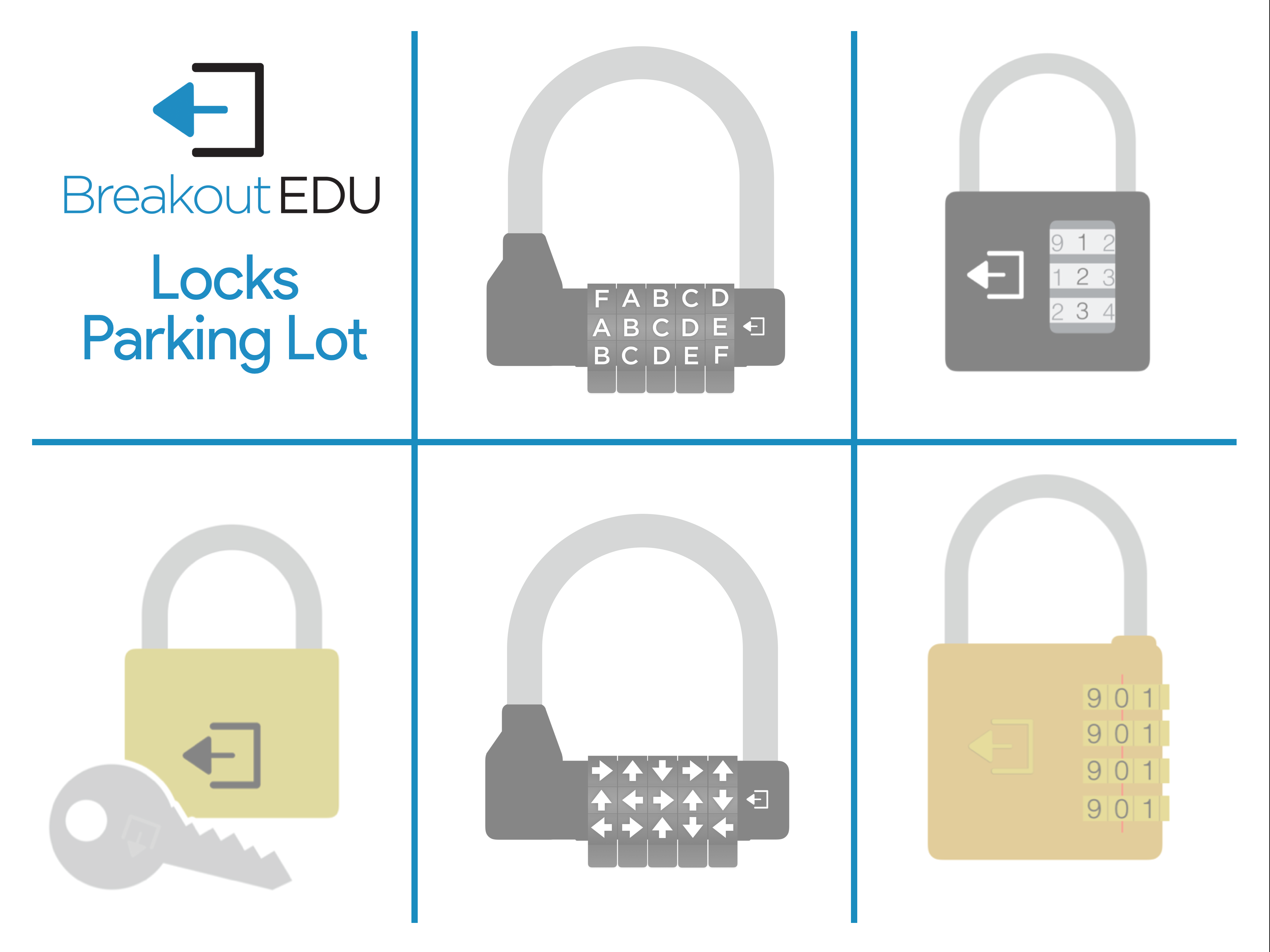
The Lock Parking Lot sign — print this and post it at the lock collection station.
The Five Puzzles
Here's how the game unfolds, puzzle by puzzle. Each puzzle tells a piece of the story while reinforcing core CS concepts.
Puzzle 1: Number Base Conversions
This is the first puzzle students receive. They convert four numbers between different bases:
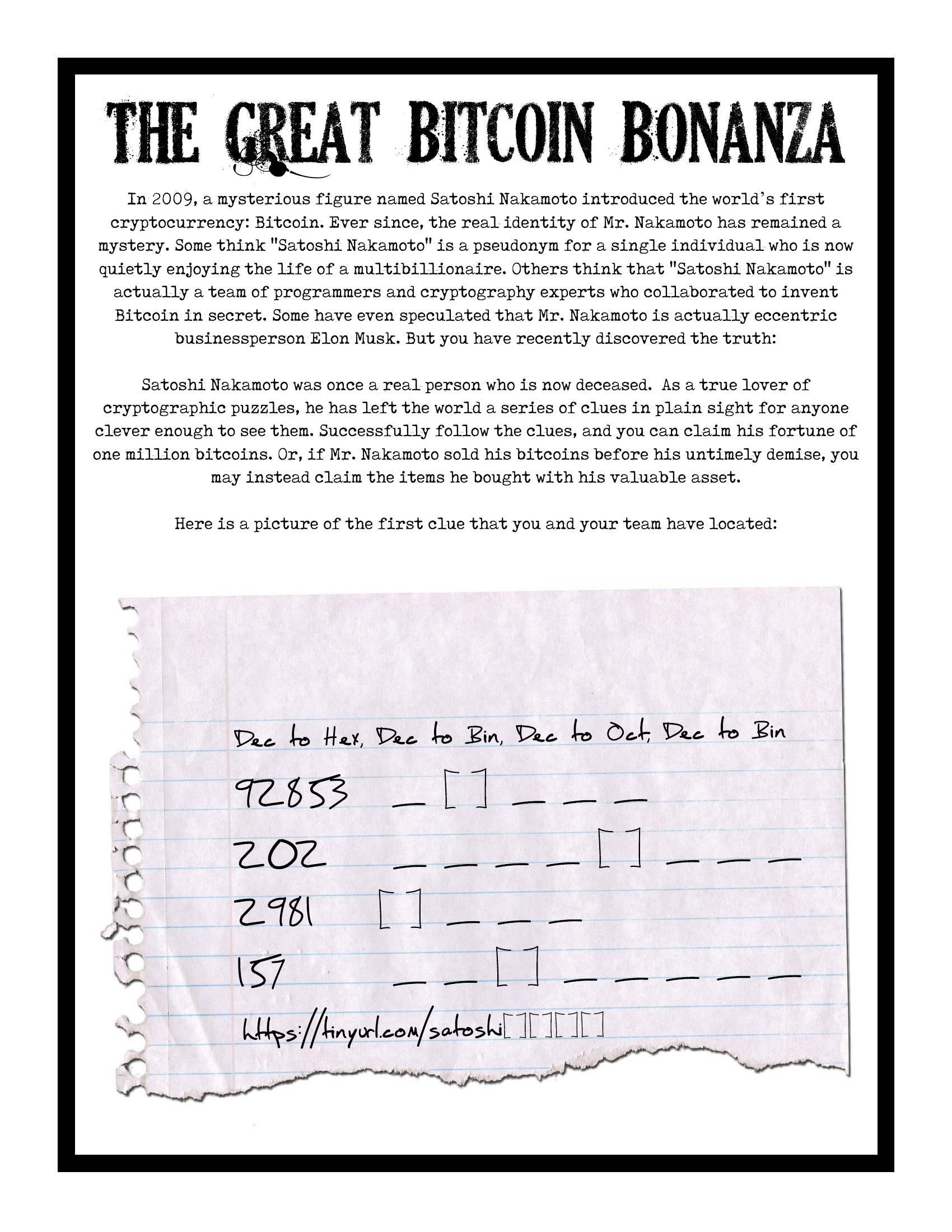
Puzzle 1 student handout (PDF | Answer Key)
- 92,853 to hexadecimal → 16AB5
- 202 to binary → 11001010
- 2,981 to octal → 5645
- 157 to binary → 10011101
When students compile these answers, they form a tinyurl code. When they enter that code in their browser (you'll host the tinyurl pages on your site or via an external service), they're directed to a simple page that reveals their first lock code: 319. This opens the 3-digit combination lock.
What's Inside: The small lockbox contains Puzzle 2 (a legal pad-style sheet), a blacklight UV flashlight, and a UV pen. This is a strategic moment—students now have the tools they'll need for the next puzzle.
CS Concept: Number systems and base conversion, understanding how computers represent data in different formats.
Puzzle 2: Encryption & Cryptography
This puzzle arrives inside the small lockbox. It's printed on legal pad paper and features four questions about encryption, digital signatures, and digital certificates. The twist: some answers are written in invisible UV ink, visible only under the blacklight flashlight students just unlocked.
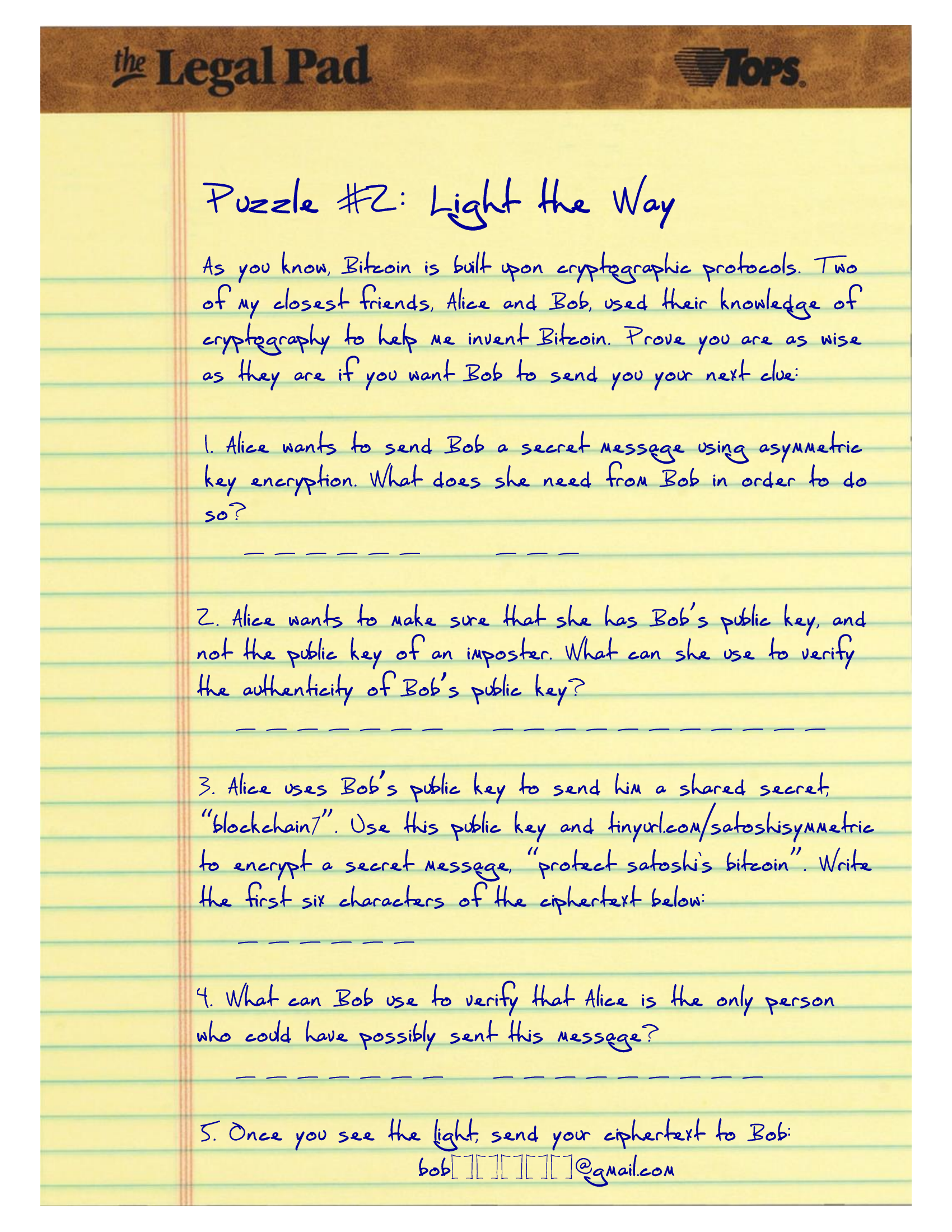
Puzzle 2 student handout (PDF | Answer Key)
The four questions are:
- What key is shared publicly in asymmetric encryption? → Public Key (visible)
- What document verifies a website's identity? → Digital Certificate (UV ink)
- After encrypting "Satoshi" with the symmetric tool, what's the encrypted value? → 8fca2d (visible, but requires using the online tool)
- What proves you wrote a message using your private key? → Digital Signature (UV ink)
For the encryption tool question, students visit your website, use the symmetric encryption tool to encrypt the message, and note the result. Once they've answered all four questions, they must email a specific address (bobBCFDE@gmail.com) with their answers. This email address has an auto-reply configured to direct them to a cabinet or drawer in your classroom where the next puzzle waits.
What This Tests: Deep understanding of cryptographic concepts—the asymmetric encryption model, the role of certificates in TLS/SSL, digital signatures, and hands-on use of encryption tools. The email requirement also teaches that authentication and communication are tied together in real-world cryptography.
Puzzle 3: Bits, Bytes & Algorithms
This puzzle is hidden in or under the cabinet where students found the small lockbox. It features four short-answer questions:

Puzzle 3 student handout (PDF | Answer Key)
- How many bits are in a nibble? → 4
- How many bits are in a byte? → 8
- If you trace this algorithm [provided], what is the first number output? → 1
- Continuing the trace, what is the fifth number output? → 5
The four answers, read in order, form a 4-digit combination lock code: 4815. This lock secures the large lockbox where the prize awaits.
The puzzle also includes a tinyurl link that, when visited, says: "The puzzle is all around you." This cryptic clue sends students to Puzzle 4—the stations posted throughout the room.
What This Tests: Data representation fundamentals (bits, bytes, nibbles), algorithm tracing and computational thinking, and pattern recognition.
Puzzle 4: Five Stations Around the Room
Five numbered papers are posted on classroom walls (duplicate copies reduce crowding). Each station presents a mix of programming and internet/network protocol questions. The catch: students must visit all five stations in order, collect one letter at each station, and compile them to spell a word that opens the word lock.
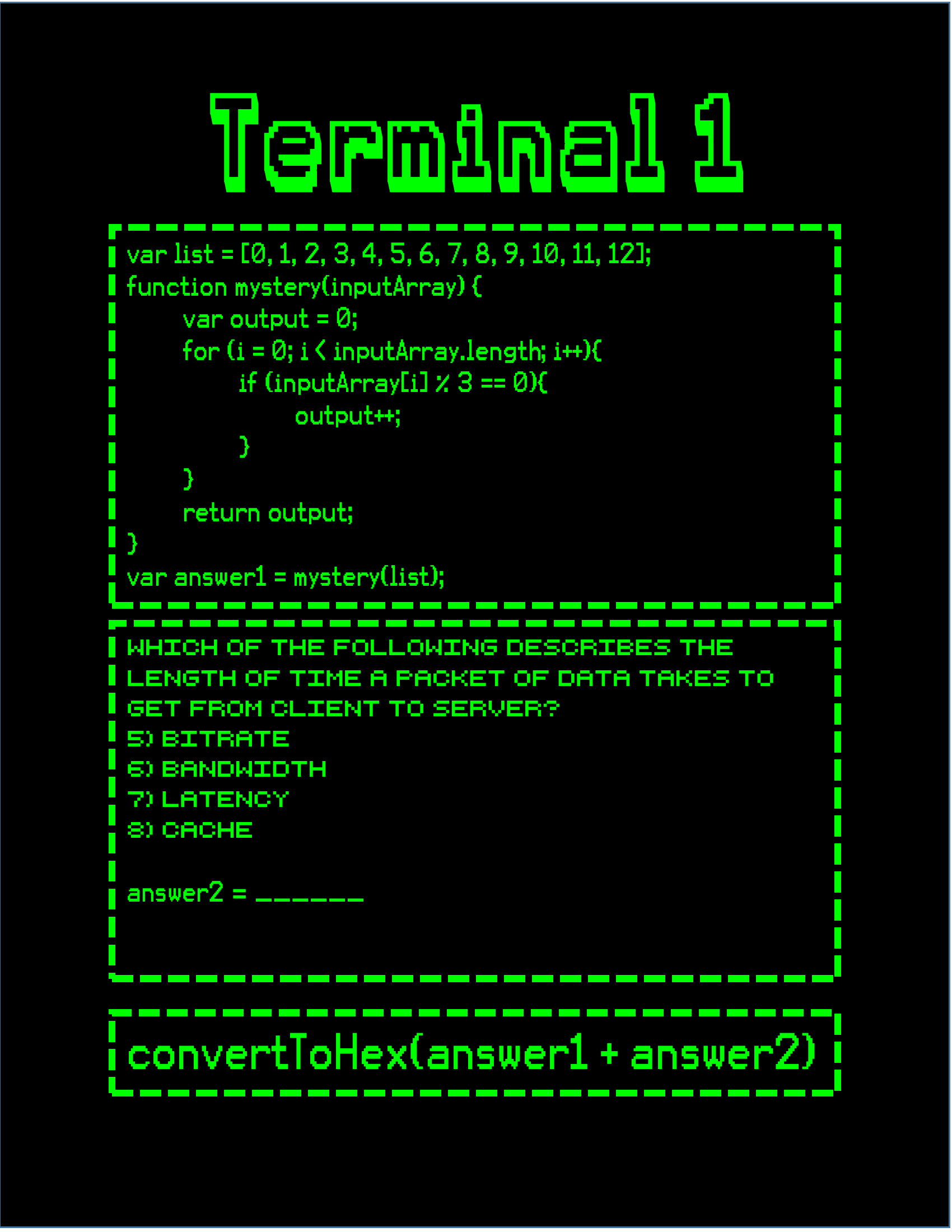
Station 1: Function Tracing — PDF
The five letters spell: CYBER
Each station covers different CS domains:
- Station 1: Function tracing—students trace code execution and answer questions about function return values and variable scope.
- Station 2: Network latency—questions about network delay, bandwidth, and data transmission rates.
- Station 3: Hexadecimal conversion—students convert between hex and decimal, reinforcing Puzzle 1's concepts.
- Station 4: Caesar cipher and cryptography—students decode a simple cipher and answer encryption-related questions.
- Station 5: DNS, TCP/IP, and protocol ordering—students demonstrate understanding of how internet communication protocols layer and interact.
A tinyurl on Puzzle 4 directs students to a hint: "Look under your desk." This clue points to Puzzle 5, hidden in page protectors taped beneath student desks.
What This Tests: A comprehensive review of foundational programming (loops, arrays, functions), network concepts, and encryption. The distributed nature of the stations also encourages teamwork and communication.
Puzzle 5: Data Security & Privacy
Students find this puzzle taped under their desks in a page protector envelope. Also inside the envelope is a metal key. The puzzle consists of four multiple-choice data security and privacy questions:
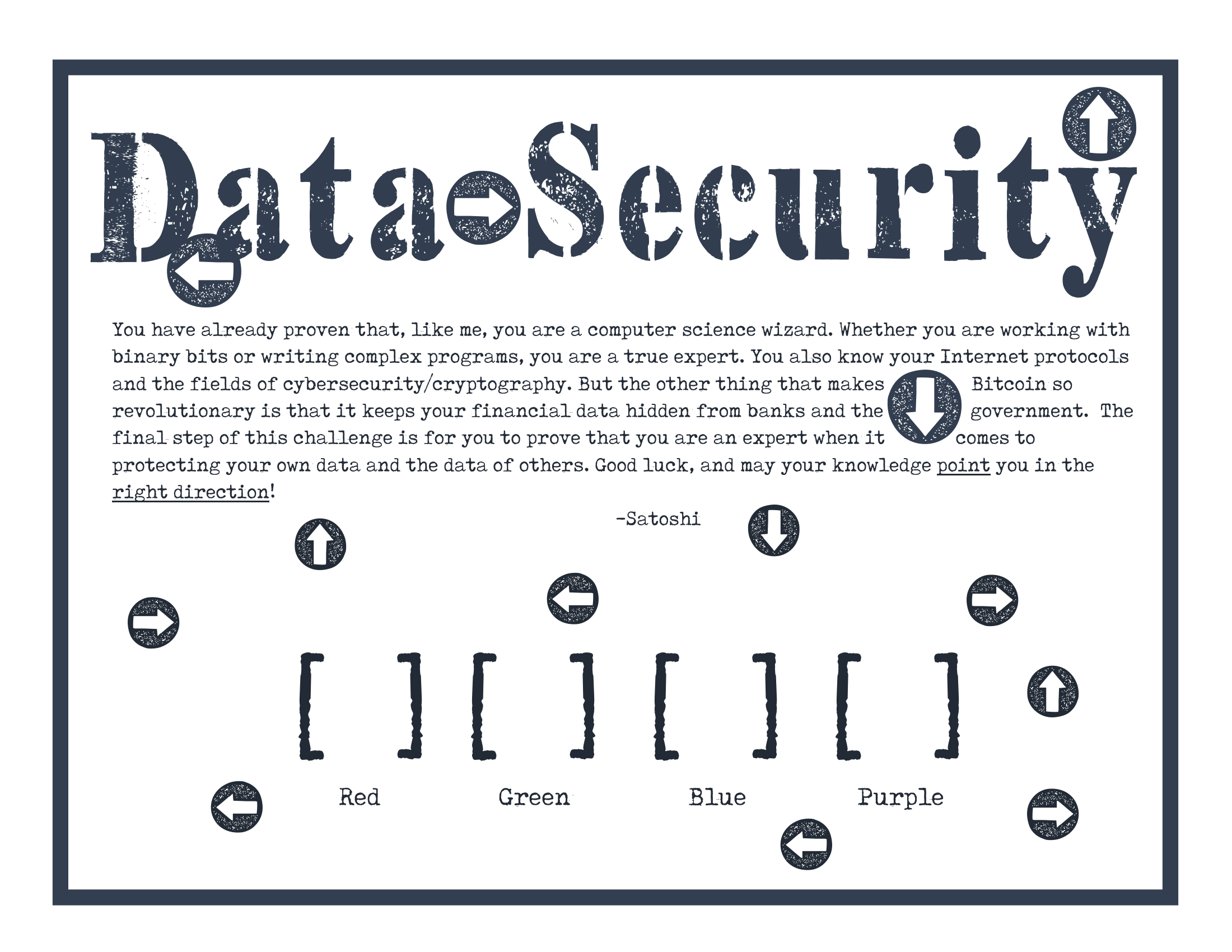
Puzzle 5 student handout (PDF | Answer Key)
- What technique hides sensitive data while keeping it usable? → T (Obfuscate data)
- Cloud computing provides what? → H (Secure access to resources from any location)
- A strong data security strategy should include... → A (All of the above)
- Moore's Law predicts... → W (Not directly about internet protocols)
The first letter of each correct answer spells: THAW
Students now understand they need to find an envelope labeled THAW. They retrieve it from the central collection of decoy envelopes (THAT, SEED, SHOP, SHIP). Inside THAW is a transparency overlay with arrow patterns printed on it.
When students place the transparency on top of Puzzle 5, the arrows align with hidden marks or sections to reveal a sequence of directional commands: Up, Down, Left, Right, Down. These directions open the directional lock on the large lockbox.
Once the directional lock is open, students use the metal key (found in the page protector) to open the final lock inside the large lockbox. They've done it—the treasure is theirs!
What This Tests: Data privacy, security best practices, encryption obfuscation, and cloud computing concepts. The transparency overlay adds a layer of visual problem-solving and spatial reasoning.
Online Components
All of the online components for this activity are already live and ready to use. You don't need to set up any websites, hosting, or URL shorteners — just print the puzzle sheets and go.
Tinyurl Clue Pages
Three of the puzzles direct students to tinyurl links that reveal clues or lock codes. These tinyurls are already active and point to themed clue pages hosted on this site:
- tinyurl.com/satoshi6150 — After Puzzle 1, reveals the 3-digit lock code (319)
- tinyurl.com/satoshi4815 — After Puzzle 3, tells students "The puzzle is all around you" (directing them to the station papers on the walls)
- tinyurl.com/satoshiCYBER — After Puzzle 4, tells students "Look under your desk" (directing them to Puzzle 5)
Each clue page is styled as a green-on-black hacker terminal to match the game's theme. You can preview them here: Clue 1, Clue 2, Clue 3.
Email Auto-Reply
For Puzzle 2, students email bobBCFDE@gmail.com with their answers. This address already has an auto-reply configured that directs students to the cabinet where the next puzzle is hidden. Just make sure your classroom WiFi allows students to send email (or let them use their phones).
Symmetric Encryption Tool
Puzzle 2 also requires students to encrypt a message using the symmetric-key encryption tool on this site (linked as tinyurl.com/satoshisymmetric in the puzzle sheet). Students encrypt the message "protect satoshi's bitcoin" using the shared key "blockchain7" and record the first six characters of the ciphertext: 8fca2d. This tinyurl is already live and points to the tool.
Tips & Tricks
Before Game Day
- Test the email: Send a test email to bobBCFDE@gmail.com to verify the auto-reply comes back. It should respond within a few seconds.
- Double-check lock codes: Verify every lock opens with its intended code. Nothing derails a game faster than a lock that won't open.
- Print, laminate, and organize: Laminate all puzzle sheets and station papers so they can be reused year after year. For puzzles that students write on (Puzzles 1, 2, 3, and 5), provide wet-erase markers — students write on the laminated sheets during the game, and you simply wipe them clean afterward. Print two copies of each Puzzle 4 station paper. Color-code materials by group if possible, so students only access their own puzzles.
- Hide Puzzle 5 thoroughly: Tape the page protectors securely under desks so they don't fall out during normal class activity.
- Arrange the whiteboard: Clear space near a whiteboard or central table where you'll place the five decoy envelopes. Students should find them easily, but not before they solve Puzzle 5.
- Test the tinyurl links: Open tinyurl.com/satoshi6150, tinyurl.com/satoshi4815, tinyurl.com/satoshiCYBER, and tinyurl.com/satoshisymmetric on a student device to verify they load correctly on your school's network.
Critical Setup Notes
- The THAW transparency is essential: Make sure it's actually in the THAW envelope, not mixed up with decoys. Students will be frustrated if the wrong envelope works.
- UV ink must be dark: Test the blacklight and UV pen before class. If the ink is too light, students won't see it under the light.
- Time management: A full class period is realistic, but only if students are moving efficiently. Have a backup plan (e.g., an extended lab period) if they get stuck on a puzzle for too long.
- No hints allowed: This is designed as an independent problem-solving activity. Resist the urge to help, even if a group struggles. If they're truly stuck after 15+ minutes, you can offer a very gentle nudge (e.g., "Are you sure you have all the tools you need?").
During the Game
- Start with energy: Set the scene. Tell students they're following clues left by Satoshi Nakamoto and that time is running. Project a timer and let the countdown heighten the urgency.
- Circulate quietly: Walk around the room, observe teams, and watch for groups that are stuck or off-track. Don't offer solutions; observe and note misconceptions for follow-up.
- Manage crowding: The Puzzle 4 stations will be the bottleneck. Enforce rotation if groups are waiting—keep everyone moving.
- Celebrate victories: When a lock opens, applaud! Make it a moment of celebration. This builds momentum and morale.
After the Game
- Debrief: Spend 10-15 minutes discussing what students learned. Ask which puzzles were hardest and why. Connect their solutions back to real-world cryptography and cybersecurity.
- Reset for the next class: Before the next period, students who finished early can photograph the reset sheet (included in downloadables) and exchange their completed puzzles for fresh copies. This keeps the activity fresh for other class sections.
- Ask for discretion: Politely request that students don't spoil the puzzles for other class periods. Part of the fun is the discovery.
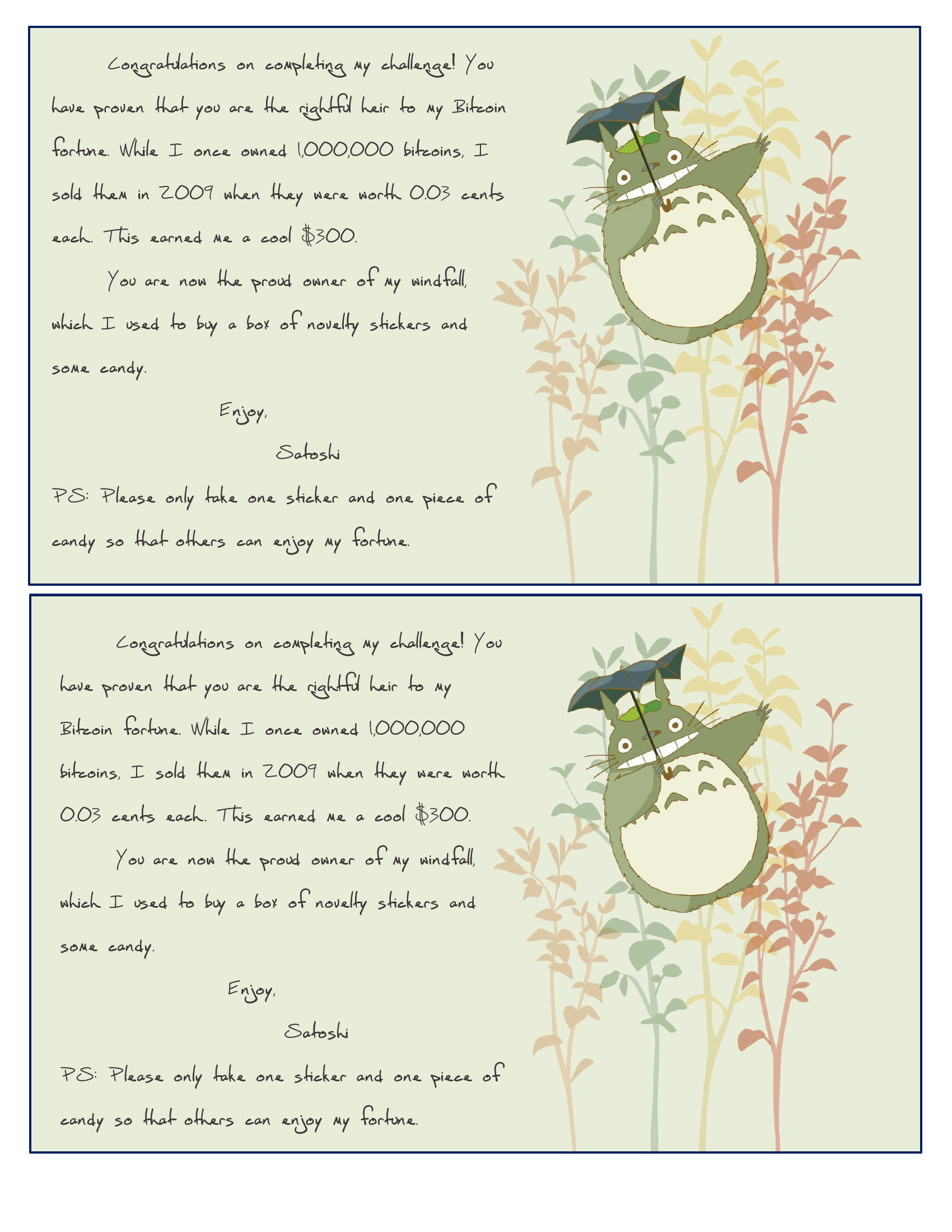
The congratulations note that goes inside the prize box (PDF)
Downloadable Materials
All files are ready to print and use. Click any link to download.
Setup & Planning Documents
- Breakout Setup.pdf — A checklist of everything you need to prepare before game day. Useful for first-time facilitators.
- Planning Document.pdf — The comprehensive planning guide with timelines, group management tips, and troubleshooting.
- Puzzle Overview.pdf — A one-page overview of all five puzzles and their lock codes. Great for quick reference during class.
Student Puzzle Sheets
- Puzzle 1 — Number Base Conversions (students receive this first)
- Puzzle 2 — Encryption & Cryptography (found in the small lockbox)
- Puzzle 3 — Bits, Bytes & Algorithms (hidden under the cabinet)
- Puzzle 5 — Data Security & Privacy (taped under desks)
Teacher Answer Keys
Station Papers (Puzzle 4)
Print two copies of each to reduce crowding around stations.
- Station 1 — Function Tracing | Answer Key
- Station 2 — Network Latency | Answer Key
- Station 3 — Hexadecimal Conversion | Answer Key
- Station 4 — Caesar Cipher & Cryptography | Answer Key
- Station 5 — DNS & Protocol Ordering | Answer Key
Miscellaneous
- Final Note — A congratulations note to print and include inside the prize box
- Lock Parking Lot Sign — A printable sign for the station where opened locks are displayed
Customize It
Want to swap out questions, adjust difficulty, or rebrand the puzzles for a different unit? All of the original editable Word documents and the custom fonts used in the puzzle sheets are available below.
Editable Source Files (.docx) & Fonts
Puzzle Documents
- Puzzle 1 · Answer Key
- Puzzle 2 · Answer Key
- Puzzle 3 · Answer Key
- Station 1 · Key · Station 2 · Key · Station 3 · Key
- Station 4 · Key · Station 5 · Key
- Puzzle 5 · Answer Key
- Final Note
- Overview / Planning Document
Fonts
Install these before opening the .docx files so the formatting renders correctly:
- Retro Computer — Terminal/hacker aesthetic on station papers
- Top Secret Stamp
- Tox Typewriter
- Karma Future · Karma Suture
- Dead Secretary · Ninja Strike · FH Script
Wrapping Up
The Great Bitcoin Bonanza turns a review session into an unforgettable experience. Your students will leave with stronger conceptual understanding of cryptography, data representation, and network protocols—not because they memorized facts, but because they solved real problems under pressure. That's where deep learning happens.
Run this activity, and you'll see why Breakout EDU has become a staple in computer science classrooms. Your students won't just review for the exam—they'll remember this lesson for years.